
Short answer: offline IoT classes win for most children under about twelve, because a broken circuit gets diagnosed in seconds when a mentor can pick up the board; online classes win for teenagers who are already comfortable with a laptop, because they can run more often, cost less and never lose an hour to traffic. Neither format is better in the abstract, and the deciding factor is usually your child's age, attention span and the distance to the nearest centre, not the syllabus.
One of the first questions parents ask us is simple: should my child learn IoT online or offline? Both work. Both have produced students who now build real connected devices. But they suit different children, schedules and budgets. Below is the honest, side-by-side comparison, dimension by dimension, including the places where offline is plainly better and no amount of good video conferencing closes the gap.
The dimensions that actually differ
Most comparisons of online and offline classes stop at "convenience versus interaction", which is not much use when you are deciding for a nine year old. In practice the two formats diverge on nine specific things, and only a few of them are about teaching quality at all.
- Hardware access: who owns the kit, who replaces a burnt-out sensor, and how quickly.
- Debugging help: how many minutes a stuck child stays stuck.
- Pace: whether the batch moves at the child's speed or the group's.
- Peer collaboration: whether children build alongside each other or in parallel isolation.
- Attention and screen fatigue: a real constraint after a full school day.
- Parental involvement: how much of your evening the format quietly consumes.
- Cost: fees, kit, and the hidden cost of travel.
- Consistency: which format survives exam season, monsoon and a busy month.
- Recovery: what happens when a child misses three weeks and falls behind.
Work through those nine and the answer for your particular child usually becomes obvious. Take them one at a time.
Hardware access: the real dividing line
IoT is not a screen subject. A child learns it by wiring a DHT11 temperature and humidity sensor to an Arduino Uno, getting nothing on the serial monitor, and then discovering that the data pin was one row off on the breadboard. That moment is the lesson. How each format delivers it differs a lot.
What offline does best
Offline, in-person workshops put real hardware in a child's hands from minute one. Breadboards, sensors, jumper wires and microcontrollers are physical, messy and wonderfully real. When a circuit does not work, an instructor is standing right there to spot the loose wire.
- Tactile learning: children build physical intuition for how components fit and connect.
- Instant help: a mentor catches mistakes in seconds, before frustration sets in.
- Peer energy: students learn fast when they see a friend's project light up across the table.
- Shared equipment: a lab can afford a multimeter, a soldering station and a spares drawer that no single family would buy.
That last point matters more than parents expect. A centre keeps spare HC-SR04 ultrasonic sensors and a box of resistors on the shelf, so a fried component costs the class five minutes. At home, the same accident costs a week and a delivery.
How online closes the gap, and where it does not
Online classes remove distance entirely. A child in a small town can learn from the same instructor as a student in a metro city. With a starter kit shipped home and a webcam pointed at the workbench, the learning is surprisingly hands-on.
- Flexibility: sessions fit around school, and recordings let students revisit tricky topics.
- Lower cost: no travel, smaller batch fees and shared digital resources.
- Wider reach: simulators like Tinkercad Circuits and Wokwi let students prototype circuits and test code before any hardware arrives.
- The kit stays home: a child can keep tinkering on a Sunday afternoon, which is where the best projects usually start.
Where online genuinely cannot match a lab is anything involving heat, power or precision: soldering, cutting an enclosure, testing a 12V supply, or rescuing a project that needs a multimeter reading to diagnose. Most beginner IoT avoids all of that, which is why online works well for the first year. It becomes a real limitation around the point a student wants to move a breadboard prototype onto a proper PCB.
Debugging help: how long a child stays stuck
This is the dimension we would weight highest for young learners. In a room, a mentor scans four benches and sees the problem before the child has finished saying "it is not working". Online, the same fix requires the child to describe the symptom, angle a camera at a breadboard and read out what the serial monitor is printing at 9600 baud. For a fifteen year old that takes about ninety seconds. For a nine year old it can take ten minutes, and ten minutes of being stuck is roughly the point at which a child decides the subject is not for them.
Good online programmes work around this rather than pretend it away. The techniques that actually help are small and practical: a second phone mounted as a document camera over the board, a shared Tinkercad file the tutor can edit live, a screen share of the Arduino IDE so the tutor can read the code themselves, and batch sizes small enough that a tutor can give one student five uninterrupted minutes. If you are evaluating an online class, ask specifically how a stuck child gets help in the middle of a session. The answer tells you more than the syllabus does. We have set out the mechanics in more detail in our guide to how online IoT classes actually work.
A blended approach often wins: online theory and coding during the week, an offline build day once a month to assemble and test real hardware together. That monthly build day is also the right slot for soldering, enclosures and anything involving mains power, done under supervision rather than at a kitchen table.
Pace, attention and screen fatigue
An IoT class is not the only screen in a child's day. By the time an evening batch starts, many students have already done two hours of homework on a laptop and a school day that increasingly involves a smart board. That context changes what a sixty minute online session can realistically achieve, and it is the reason two children of the same ability can have completely different experiences of the same class.
Younger learners, roughly ages 8 to 12
Attention is the binding constraint at this age, not ability. Children of eight or nine can absolutely wire an LED with a resistor and write a blink sketch, but they need to be moving, touching and talking to hold focus. A physical room does that work for you. Online, the same child needs a parent within earshot for the first few sessions, a session length closer to forty five minutes than ninety, and a tutor who breaks the hour into short build tasks rather than explaining for twenty minutes. If your child is at the younger end, our note on the best age to start IoT and coding is worth reading before you pick a format.
Teenagers, roughly ages 13 to 22
From about thirteen the calculation flips. Teenagers can hold a debugging thread across a week, read documentation on their own and search an error message before asking anyone. For them, online removes friction rather than adding it. They can attend from a hostel, come back to a project at 11pm, and replay a recorded session at their own pace. Older students building a portfolio or a college project often prefer online for exactly this reason, and it pairs well with the kind of independent work described in our guide to Raspberry Pi projects for teenagers.
Peers, teams and the part that is not on the syllabus
Hardware projects are social in a way that pure coding is not. Two children sharing a breadboard will argue about where the ground rail goes, and that argument is where the understanding actually forms. A room full of half-built projects also sets a quiet standard: a child sees what is possible at the next bench and reaches for it without being told to.
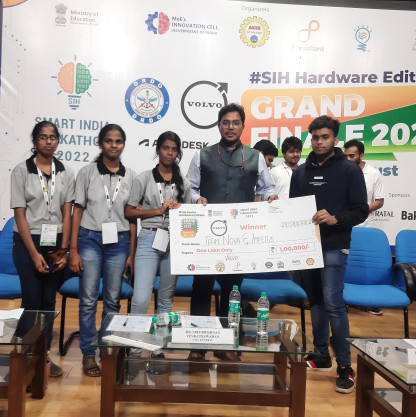
Online can reproduce some of this with paired projects, a class channel where students post photos of what they built, and demo sessions where each child shows a working device on camera. It does work, but it has to be deliberately organised. If an online programme has no structured way for students to see each other's work, you are buying tuition rather than a cohort. That distinction matters most for team goals such as hackathons and school science exhibitions, where dividing the work and integrating somebody else's module is half the skill being tested. We learned that the hard way building for the Smart India Hackathon 2022 Grand Finale, where the hardware came together only because four people could argue over one table.
"The best format is the one your child will actually show up to every week. Consistency beats intensity."
Cost, travel and the hours you will spend
Fees are the visible number, and online is almost always lower because there is no room to rent, no equipment to maintain and larger batches are practical. But the fee is rarely the whole cost. Work through the full picture before you compare two quotes.
- Hardware. A reasonable beginner kit with an Arduino Uno compatible board, breadboard, jumper wires, LEDs, resistors, a DHT11 and an HC-SR04 costs roughly INR 1,500 to 3,000 in India, or around AED 120 to 250 in the UAE. An ESP32 board, which you will want as soon as projects need Wi-Fi, is roughly INR 400 to 700 on its own. Offline programmes often include kit use in the fee; online programmes usually ship a kit the student keeps.
- Travel. Two trips a week to a centre thirty minutes away is two hours of a parent's week, every week, plus fuel or fare. Across a six month programme that is a real number, and it is often larger than the difference in fees.
- Parent time during class. Online with a younger child means being available, not merely at home. Offline buys you a genuinely free hour.
- Replacement parts. Budget a few hundred rupees for the sensors and the one board that will not survive the year. This is normal and is not a sign of carelessness.
Put plainly: online is cheaper in money, offline is cheaper in parent attention during the session itself, and offline is more expensive in travel. Whichever of those three you have least of should decide the format.
Consistency, and what happens when a child falls behind
Every programme looks the same in week one. The difference shows up in week nine, during exams, or after a fortnight of illness. Offline has a natural advantage in habit formation, because the class is a place you go to at a fixed time and missing it is visible to everyone. Online is easier to skip quietly, and a skipped session with hardware is worse than a skipped session with a workbook, because each project assumes the last one was built.
The recovery path differs too. Offline, a child who has missed two weeks can arrive twenty minutes early and rebuild the missed circuit with a mentor. Online, that same child has recordings, which sound like a solution and often are not: watching somebody else wire a sensor is not the same as wiring it. What actually works online is a short one to one catch-up call before the next class plus a cut-down version of the missed project, so the child rejoins the batch with something working in front of them. Ask any provider whether that catch-up is included or charged extra, because falling behind quietly is the most common reason students drop out halfway through a term.
One consistency point runs the other way, in favour of online. It survives disruption that offline does not. Heavy rain, a family trip, a school event or a temporary move to another city can end an offline term and barely dents an online one.
Which child suits which format
Rather than a verdict, here is how we would advise a parent who had just described their child to us. Most families recognise themselves in one list or the other within a few lines.
Choose offline if
- Your child is under about twelve, or is at any age impatient with screens.
- Your child learns by touching things, taking them apart and asking questions out loud.
- There is a centre within a sensible travel distance and your week can hold a fixed slot.
- The goal involves a team: a school competition, a science exhibition or a hackathon entry.
- The projects are heading towards soldering, enclosures or anything beyond a breadboard.
- Your child has already tried an online class and stopped turning up.
Choose online if
- Your child is thirteen or older and reasonably self-directed.
- You live in a town or district without a specialised STEM centre nearby.
- The weekly schedule is tight and a fixed travel slot would be the first thing to break.
- You want to test whether the interest is real before committing a larger budget.
- Your child likes to keep working on a project between sessions, with the kit at home.
- Terms, exams or travel make attendance unpredictable and recordings would genuinely help.
If your child sits between the two lists, the practical move is to start online for one short term, then add offline build days once the interest holds. Starting online tests commitment cheaply. Adding offline later gives depth exactly when the projects begin to need it. That sequence, rather than one format for the whole journey, is what we see work most often. Schools we work with tend to arrive at the same shape on their own: weekly online sessions, one lab day a month.
What to do next
Pick one thing to do this week rather than deciding the whole year now. In order: build one project at home, watch how your child responds to being stuck, then choose the format that fits what you saw.
- Build one simple project together this weekend. Our list of beginner IoT projects kids can build at home has options that need only a board, a sensor and an hour.
- If you have no hardware yet, start in a simulator. Tinkercad Circuits runs in a browser and costs nothing, and our introduction to Arduino for beginners explains what to try first.
- Watch for the stuck moment. If your child keeps trying on their own, online will suit them. If they need somebody sitting beside them, choose offline or a blended plan.
- Book a trial session in the format you picked, and ask the two questions that matter: how many students are in the batch, and how does a stuck child get help in the middle of a session.
Fizon Tech runs both formats for students aged 8 to 22, from our base in Trichy, Tamil Nadu and our office in Dubai. You can see the syllabus, batch sizes and project list on the IoT for Kids programme page, or tell us about your child and we will say honestly which format we would recommend, including the times when the answer is neither one yet.
Written by M Khaushalya, Business Lead, India at Fizon Tech. Much of that work involves helping parents and school heads across Tamil Nadu choose between online and in-person formats for Fizon Tech's IoT, robotics and STEM programmes for students aged 8 to 22.